

























Percentages: choose the right baseline and separate percentage points
Work through 15% of 240, a 200-to-250 change and a 20%-to-25% rate comparison.
Several questions contain a percent sign but require different denominators. Before entering values, write down whether you need a share of a total, the percentage represented by a part, a relative change or a difference between two rates. This guide uses simple count examples, not financial or health recommendations.
In this guide
Find a percentage of a quantity
For 15% of 240, enter 15 as the percentage and 240 as the base quantity in the matching calculator form. The calculation is 15 × 240 ÷ 100 = 36. Do not enter 0.15 into a field that already expects a percentage: that would calculate 0.15% and give a result one hundred times smaller.
15% × 240 = 15 × 240 / 100 = 36
36 / 240 × 100 = 15%
Compute a relative change using the original value
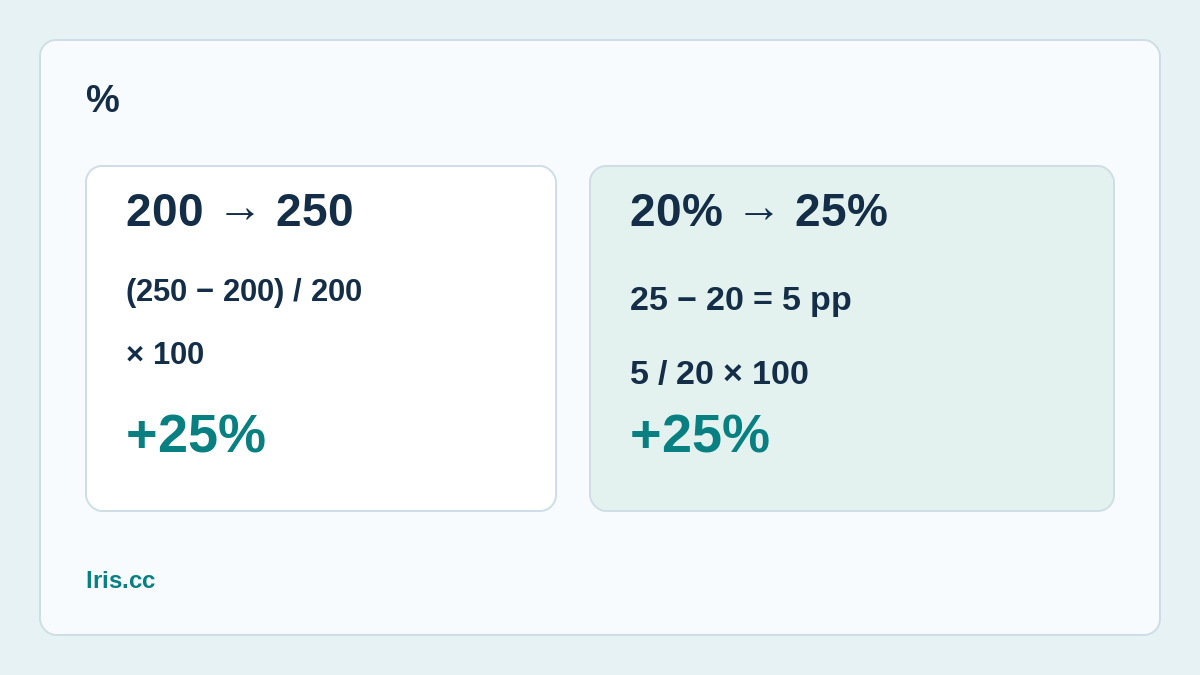
If a count rises from 200 to 250, the difference is 50 and the original value is 200. Calculate 50 as a percentage of 200 to obtain a 25% increase. Enter the difference and original value in the form asking what percentage one number is of another; entering 250 and 200 answers a different question, 125%.
(250 − 200) / 200 × 100 = 25%
(200 − 250) / 250 × 100 = −20%
Returning from 250 to 200 is a 20% decrease, not a 25% decrease, because the starting value changed. Keep the sign when reporting a decrease, or state the magnitude and the word decrease consistently. Do not change the denominator simply to make two opposite journeys look symmetrical.
Separate percentage points from percent change
Suppose a completion rate changes from 20% to 25%. The difference between the two rates is 5 percentage points. Relative to the original 20%, it is a 25% increase. Both numbers can be correct, but they describe different comparisons. Write the unit explicitly in the result instead of reporting a bare 5 or 25.
25% − 20% = 5 pp
(25 − 20) / 20 × 100 = 25%
Handle zero and rounding carefully
- A relative change from an original value of zero is undefined under this formula. Report the actual change, such as 0 to 12 items, rather than claiming a finite percentage increase. A form may correctly reject a zero reference value.
- Keep unrounded intermediate values when comparing results. The calculator’s what-percent form rounds its displayed result to two decimal places. A displayed 33.33% is an approximation to one third, not an exact replacement in a long chain of calculations.
Make the result understandable to another person
Record the part, total or original value alongside the result. A useful sentence is: the count rose from 200 to 250, an increase of 50 items or 25%. For rates, state both the percentage-point difference and the relative comparison when readers could confuse them. This makes the denominator visible and the calculation reproducible.
