
























URL encoding: protect query values without breaking a link
Compare spaces, plus signs, ampersands and a deliberately double-encoded value.
A search phrase containing an ampersand can accidentally become two query parameters. The opposite mistake is encoding a complete link and then trying to open the encoded text as a normal address. Use the examples below to distinguish a parameter value from the surrounding URL structure.
In this guide
Start with a value, not the whole address
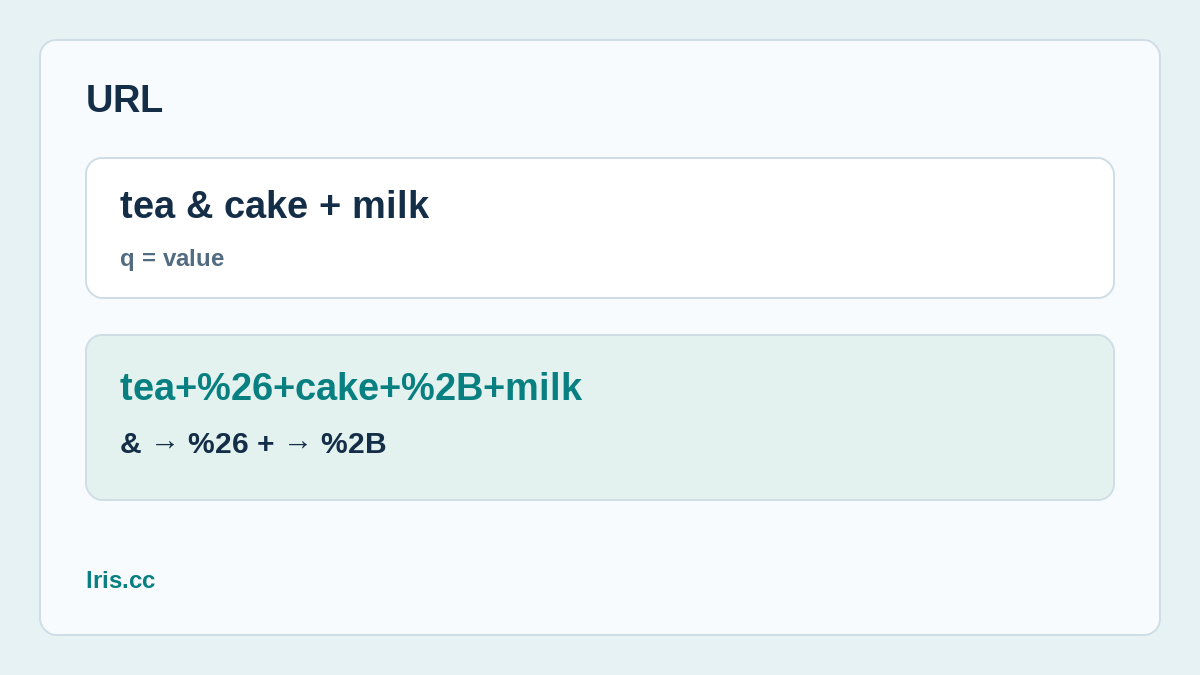
Suppose the search phrase is tea & cake + milk. The characters & and + have special meanings in form-style query strings. Encode the phrase before using it as the value of q. The lris URL Encode tool uses form-style encoding, where a space becomes + and a literal plus sign becomes %2B. This is not identical to every JavaScript component encoder.
tea & cake + milk

tea+%26+cake+%2B+milk

https://example.com/search?q=tea+%26+cake+%2B+milk
Check an encode–decode round trip
- Paste only the phrase into URL Encode and run it. Check that the ampersand is %26 and the literal plus is %2B. Ordinary letters should remain readable.
- Copy the result into URL Decode and decode once. The expected value is exactly tea & cake + milk, including its spaces and plus sign. A different result means the encoding or decoding convention needs investigation.
Recognise double encoding
Encoding a value that is already encoded changes each percent sign into %25. For example, tea%20cake becomes tea%2520cake. One decode then returns tea%20cake rather than tea cake. Do not repeatedly decode unknown input until it looks readable: a second decode can change the meaning of data that intentionally contained percent sequences.
tea%20cake → tea%2520cake
tea%2520cake → tea%20cake
Keep URL structure separate from the payload
A normal address needs its scheme, host, path and separators. Encoding the entire https://example.com/search?q=tea string turns structural characters into data. That can be correct when one URL is deliberately passed inside another URL’s parameter, but it is usually wrong for the address you want a visitor to open directly.
- Before sharing a link, inspect its host and path with URL Parser. Confirm that q is one intended parameter and that a fragment after # has not been accidentally moved into the query.
- Treat URL encoding as a transport format, not encryption or protection against malicious input. Encoded credentials remain credentials; keep passwords and access tokens out of shared URLs.
For a practical handoff, keep both the human-readable value and the final assembled URL in your test notes. That makes a missing space, an extra parameter or a second encoding pass much easier to spot.
