

























Build a UTM link without losing existing parameters or its fragment
Use one campaign example to verify replacement, encoding, attribution labels and the landing page.
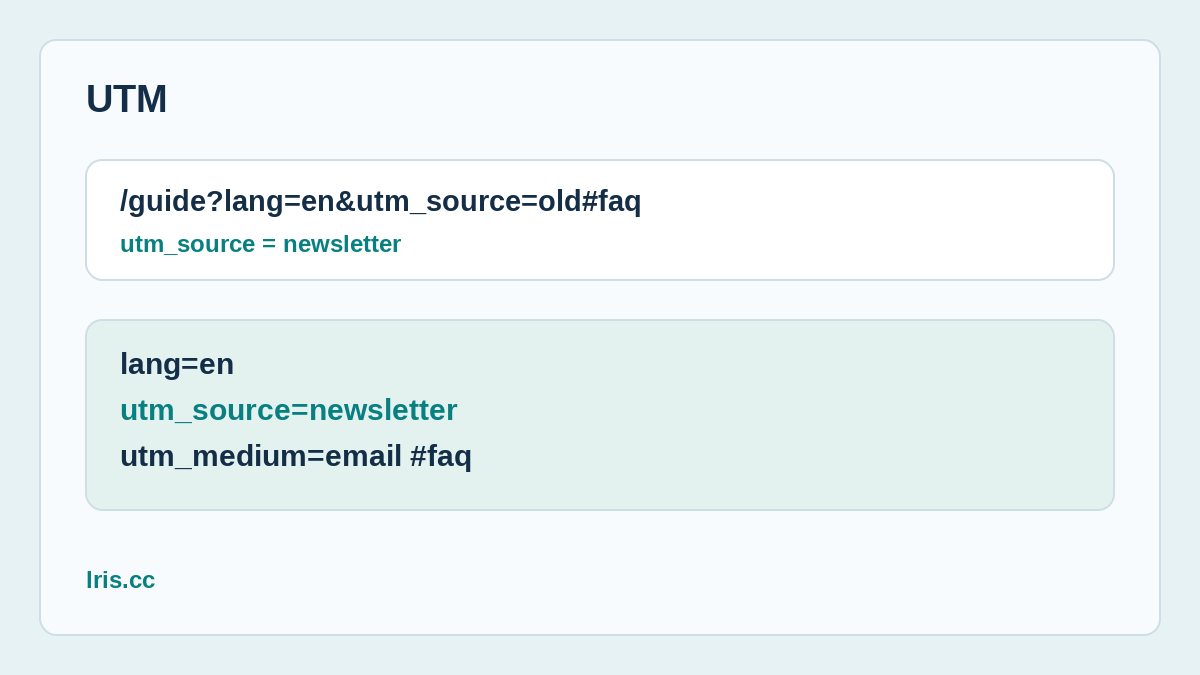
Campaign links should record where a visitor came from while still opening the intended page. This example starts with an existing language parameter, an old source label and a fragment. The goal is a clean new campaign link, not a second layer of conflicting tracking values.
In this guide
Define a naming convention first
Use utm_source for the referrer, utm_medium for the channel and utm_campaign for the campaign name. In this example they are newsletter, email and spring launch. Decide spelling and capitalisation before creating many links, because inconsistent labels make reporting harder. These parameters describe a campaign; they should not contain a person’s email address or other identifying data.
https://example.com/guide?lang=en&utm_source=old#faq
utm_source: newsletter
utm_medium: email
utm_campaign: spring launch
Generate and inspect the result
- Paste the base URL into UTM Builder and enter the three campaign values. Leave content and term blank for this example. Generate the link, then compare its components with the expected result.
https://example.com/guide?lang=en&utm_source=newsletter&utm_medium=email&utm_campaign=spring%20launch#faq- Confirm that lang=en remains, utm_source=old is replaced and the new source appears only once. The space in spring launch should be encoded, and #faq should remain at the end as a fragment.
Understand what this builder replaces
The builder replaces existing parameters for campaign fields that you actually fill in. Leaving a field blank does not necessarily remove an old value for that field from the base URL. If a previous utm_content should disappear, remove it deliberately from the starting link and check the generated output. A copied URL can also carry unrelated parameters that deserve review.
Test the real destination before distributing it
The example.com address is a structural example, not a promised live campaign destination. Repeat the test with your own public page. Open the final link, check that it lands on the expected content and verify that any redirects preserve the parameters you need. If the fragment is meant to jump to a section, check that the section exists.
- Compare two links from the same campaign. Keep source, medium and campaign consistent; use utm_content when you intentionally need to distinguish two placements, such as header and footer links in one email.
- Do not expect a UTM string alone to create analytics reports. Reporting also depends on your analytics setup, consent choices, redirects and filtering. Verify collection in the relevant analytics tools rather than treating a generated link as proof of a recorded visit.
Keep a small campaign register
Record the destination, three main labels, optional placement label and date. Review one link from each placement before sending the campaign. This small check prevents avoidable errors such as mixed capitalisation, obsolete source values and links to the wrong language version.
